*sshole: One Long Password Opens SSH Accounts That Have None
A password longer than 256 bytes can open SSH accounts on Alpine Linux that were never meant to take a password. OpenSSH and Alpine shipped fixes on 5 November. Patch now, or switch password logins off.
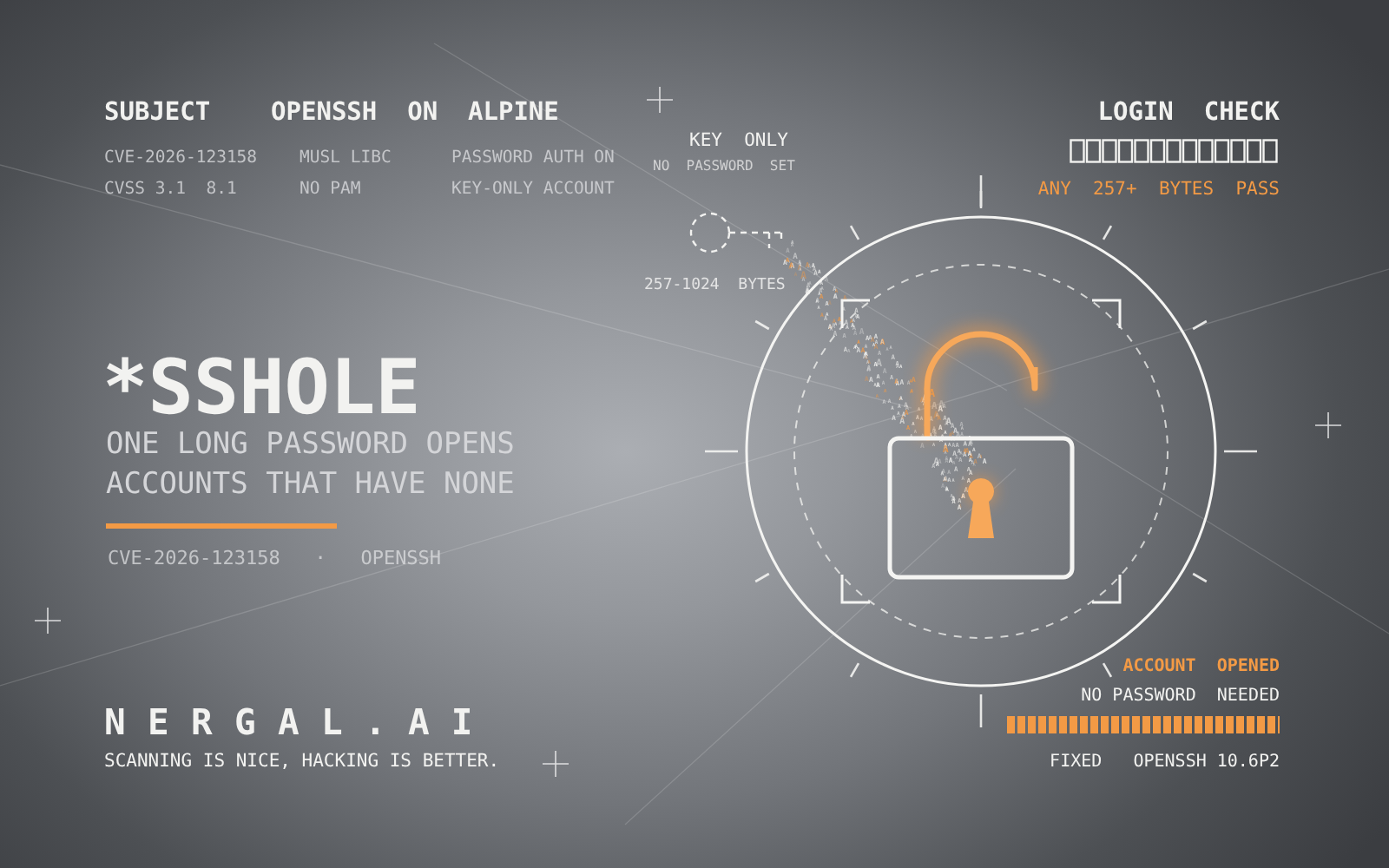
Attackers can log in to SSH accounts that have no password, such as key-only accounts, on some Alpine Linux servers. They need network access to the server, the name of such an account and a password between 257 and 1,024 bytes long. Alpine says the attack works on the first try.
OpenSSH, which calls the flaw critical, released version 10.6p2 on 5 November to block it, and Alpine published fixed packages for every release back to 3.16. The flaw is tracked as CVE-2026-123158. Özgün Kültekin of Wakefield, who found it, calls it *sshole.
Damien Miller of OpenSSH put the advice plainly: on affected systems, "set PasswordAuthentication=no or disable SSH for these systems IMMEDIATELY." No attacks have been reported, but the CVE record already links to two public labs that reproduce the bug.
| Key fact | Detail |
|---|---|
| CVE | CVE-2026-123158, nicknamed *sshole |
| Severity | Critical, per OpenSSH; CVSS 3.1 8.1 (High) |
| Weakness | CWE-394, unexpected status code or return value |
| Affected | Linux systems built on musl libc that check passwords without PAM, such as Alpine's openssh-server |
| Attacker needs | Network access, the name of an account with no password, and a password of 257 to 1,024 bytes |
| Fixed in | OpenSSH 10.6p2; Alpine packages from 3.16 to edge; Alpine 3.21.10, 3.22.8, 3.23.8 and 3.24.4 |
| Found by | Özgün Kültekin of Wakefield |
Who is exposed
A server is exposed only when all four of these are true, according to Alpine's advisory:
- It runs the openssh-server package, which is built without PAM, or openssh-server-pam with UsePAM no.
- PasswordAuthentication is yes, which is the OpenSSH default.
- An account has * as its password field, which means no password is set.
- At least one other local account has a password hash starting with $5$ or $6$.
One account with a password is enough to expose every account without one. The attacker still needs the name of one of those accounts.
Accounts with no password on Alpine include:
- key-only users created with adduser and no password, or with usermod -p '*'
- users who come from a directory service through musl-nscd, since they have no shadow entry
- root, which has shipped as root:* in the base image since about Alpine 3.16
- the alpine user in the official cloud images built with tiny-cloud
The road to root. Root itself is protected by the default PermitRootLogin prohibit-password setting, and can be reached directly only if PermitRootLogin is set to yes. That doesn't help if an exposed account can become root, for example through doas.
That's the case on tiny-cloud images from 3.18.11 through 3.24.3, which give the alpine user passwordless doas. They're safe at first boot, but become open to attack once any $6$ hash exists on the machine, for example after an admin sets a console password. An attacker can then log in as alpine and use doas to become root.
Not affected: containers that don't run sshd; systems with PasswordAuthentication no, including cloud images set up through cloud-init, which writes that setting; openssh-server-pam with UsePAM yes; accounts locked with ! in /etc/shadow; and machines where no account has a $-style hash. Non-Linux systems and Linux systems built on glibc aren't affected either.
Beyond Alpine. Kültekin's write-up names OpenWrt, Buildroot and Yocto as other musl-based systems to check, along with "a lot of the docker images you've pulled." OpenWrt runs Dropbear for SSH by default, and Kültekin says Dropbear isn't affected, so on OpenWrt the flaw matters only where an admin has installed the OpenSSH server.
Check a server. Run these as root:
# 1. Which SSH server package is installed?
apk info -e openssh-server openssh-server-pam

# 2. Password logins (and PAM, if built with it), as sshd sees them
sshd -T | grep -Ei '^(passwordauthentication|usepam)'

# 3. Accounts with no password set
awk -F: '$2 == "*" {print $1}' /etc/shadow

# 4. Accounts with a $5$ or $6$ hash
awk -F: '$2 ~ /^\$[56]\$/ {print $1}' /etc/shadow
The server is exposed if step 2 shows passwordauthentication yes (and usepam no, if it shows usepam at all), and steps 3 and 4 both print a name. Directory-service users don't appear in /etc/shadow, so step 3 won't list them.
How to fix it
On Alpine, update the packages, then restart sshd. Upgrading the package doesn't replace the server that's already running, so the restart is what closes the hole.
apk upgrade -U -a
rc-service sshd restart
These are the fixed openssh versions from Alpine's advisory:
| Alpine branch | Fixed openssh version |
|---|---|
| edge | 10.6_p2-r0 |
| 3.24 | 10.3_p1-r2 |
| 3.23 | 10.2_p1-r1 |
| 3.22 | 10.0_p1-r11 |
| 3.21 | 9.9_p2-r1 |
| 3.20 | 9.7_p1-r6 |
| 3.19 | 9.6_p1-r3 |
| 3.18 | 9.3_p2-r4 |
| 3.17 | 9.1_p1-r7 |
| 3.16 | 9.0_p1-r6 |
The point releases 3.21.10, 3.22.8, 3.23.8 and 3.24.4 already include the fix. Branches 3.16 to 3.21 are past their end of support, 3.21 since 1 November, but got fixed packages anyway. Cloud instances started from tiny-cloud images older than those point releases still need the update, or the setting below.
If you build OpenSSH yourself, 10.6p2 includes the change.
If you can't update yet, turn password logins off. First make sure your SSH key login works, and keep your current session open until a new login succeeds. Then, as root:
echo 'PasswordAuthentication no' > /etc/ssh/sshd_config.d/00-no-passwords.conf
sshd -t && rc-service sshd restart
sshd -T | grep -i passwordauthentication
The last command should print passwordauthentication no. Alpine's default configuration reads the sshd_config.d folder from 3.19 onward. On older releases, set it in /etc/ssh/sshd_config instead. Also change every PasswordAuthentication yes in that file to no, including lines inside a Match block, which would otherwise switch password logins back on for the users they match. The advisory gives commands for both.
Check whether anyone got in. Look in /var/log/messages for sshd lines reading Accepted password for an account that has no password, such as alpine, root or a key-only user:
grep 'Accepted password' /var/log/messagesOn a machine that was exposed, also review doas use, recently created users, changed files and authorized keys. As Alpine puts it: "If you cannot rule out a login, treat the machine as compromised."
Why a long password works
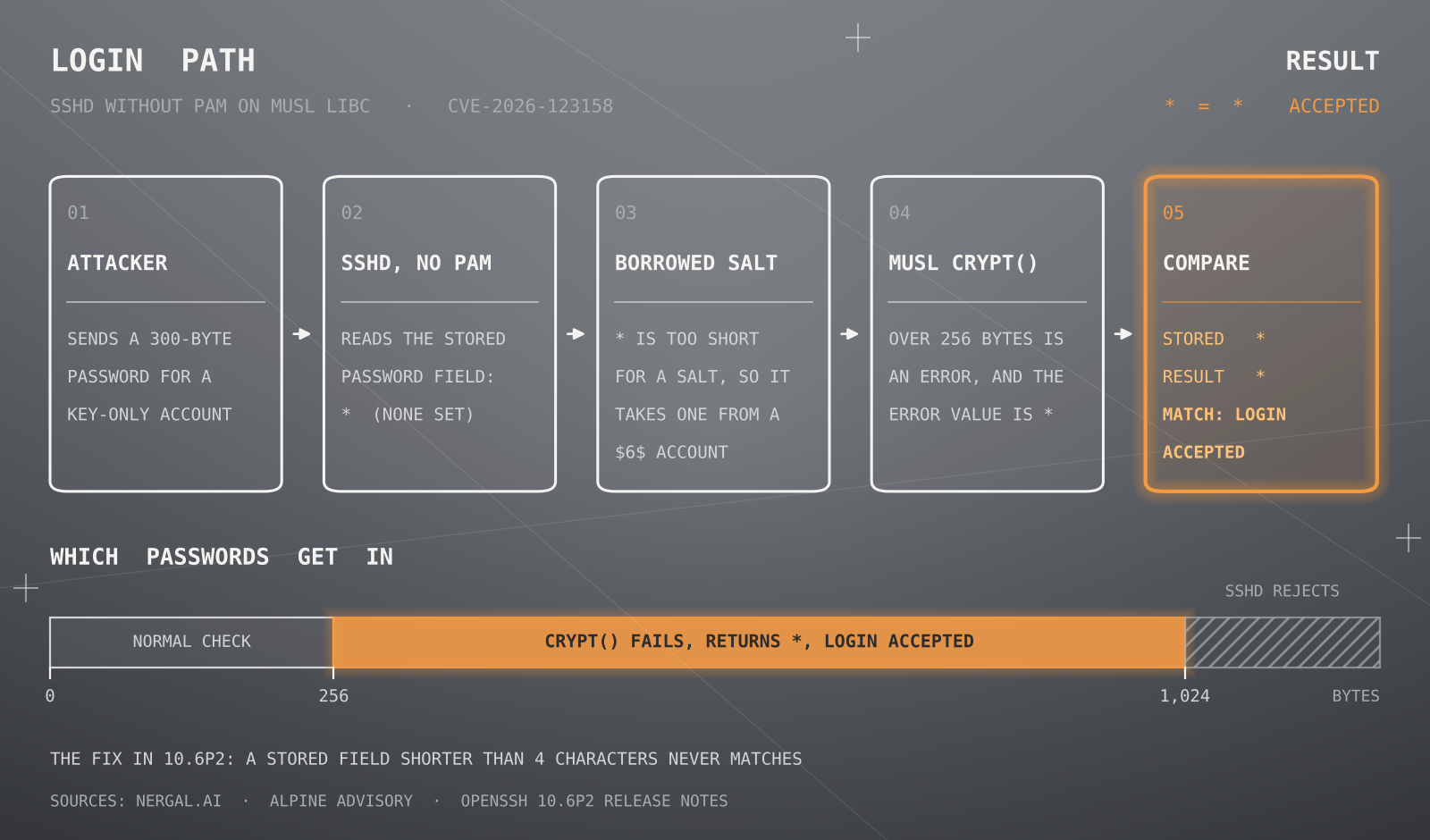
Without PAM, sshd checks a password itself. It runs the attempt through crypt(), the C library function that turns a password into its stored form, and compares the result with the account's password field.
An account with no password has only * in that field. That's too short to hold a salt, the random prefix that starts every hash, so sshd borrows the salt of another account that has a real hash.
On musl, that's where it breaks. For $5$ and $6$ hashes, musl's crypt() refuses passwords longer than 256 bytes and returns * to signal the error. That * matches the stored *, so sshd lets the attacker in. The upper end of the range is sshd's own limit of 1,024 bytes per password.
Two sensible choices, four years apart
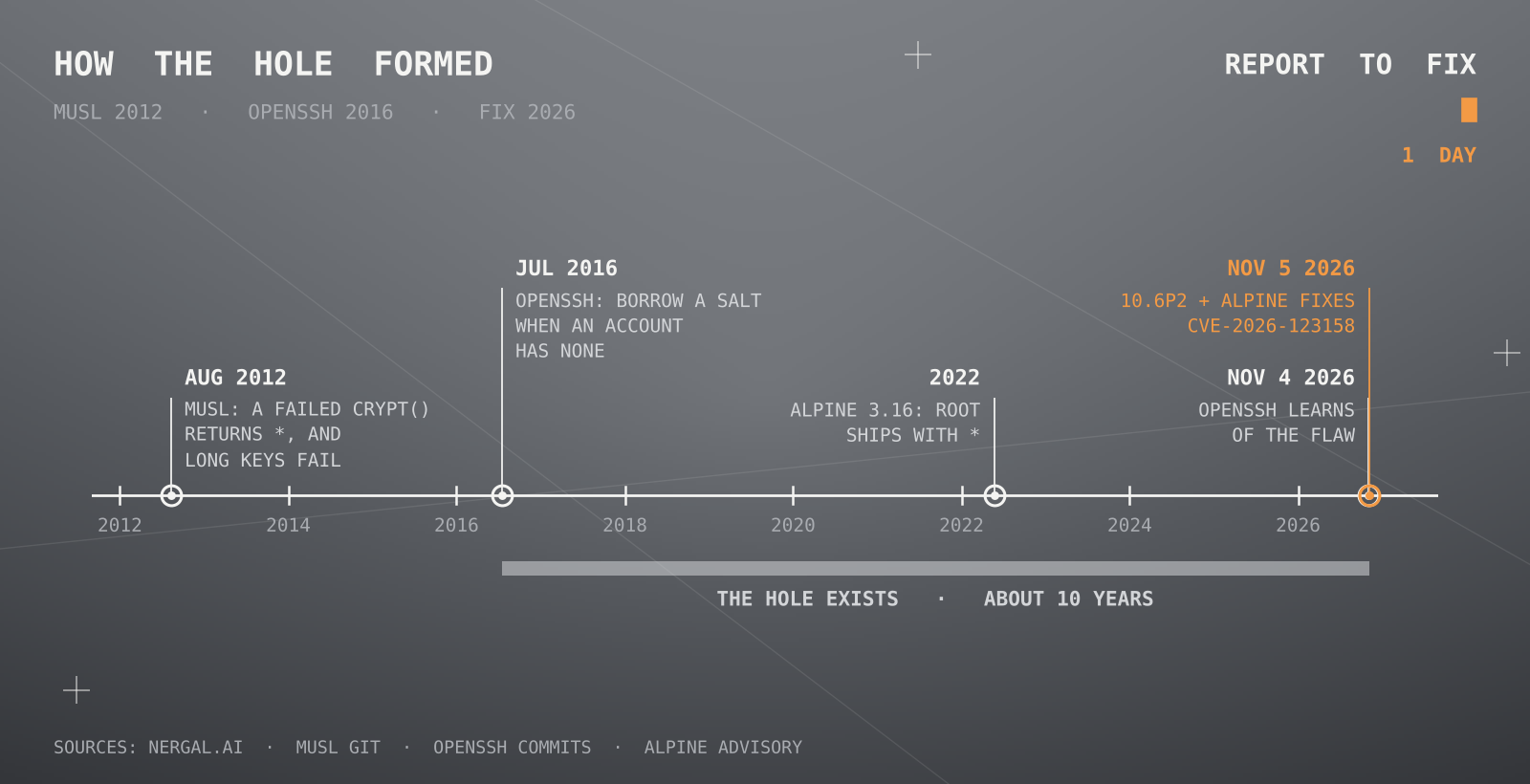
Neither piece is a mistake on its own. On 9 August 2012, musl changed crypt() so that a failure returns a hash that can never match, instead of NULL, because many programs never checked for failure. On 29 August 2012, it added the 256-byte limit to protect servers from denial-of-service attacks.
The salt borrowing comes from an OpenSSH change on 15 July 2016 that fixed CVE-2016-6210, a flaw that let attackers learn which usernames exist by timing failed logins. Kültekin says the problem has existed since then.
The value built to never match turned out to match exactly one thing: an account with no password.
The fix
The 10.6p2 change makes sshd refuse a match when the stored field is shorter than four characters. OpenSSH calls it a workaround: "We consider the root cause of this bug to be outside sshd, but it is exploitable via sshd and can be avoided there." Alpine's stable packages carry a patch for the same problem.
Why the fix came the next day
OpenSSH learned of the flaw the day before it shipped 10.6p2. In his announcement, Miller explained why the team didn't hold it for a longer embargo: it now considers "long embargo periods to be a dangerous practice that primarily benefits attackers," because it has "recently observed multiple cases of rapid bug rediscovery by AI agents, sometimes within hours."
The finder used AI too. Kültekin's write-up says he had "agent swarms. a lot of them."
Our take
This is what a good response looks like. A report came in, and a day later there was a fix, an advisory, a CVE and patched packages for ten Alpine branches.
It's the other side of what we wrote about in our last post, The Other APT, where our report to APT's maintainer went unanswered for five weeks. Miller's reasoning is the same one we made there. When AI can find a bug in hours, every day a report sits unanswered is a day someone else can find it too. The best way to close that window is to answer the report.
Sources
- Alpine Linux: Security advisory: openssh-server password authentication bypass, 5 November 2026
- OpenSSH: 10.6p2 release notes
- Damien Miller: OpenSSH 10.6p2 announcement, openssh-unix-dev, 5 November 2026
- OpenSSH: "avoid password authn bypass" commit, 5 November 2026
- CVE Program: CVE-2026-123158
- Özgün Kültekin: *sshole
- OpenSSH: "Determine appropriate salt for invalid users" commit, 15 July 2016
- The Hacker News: OpenSSH Issues Emergency Fix for Flaw Letting Long Passwords Bypass SSH Auth on Alpine Linux